How to write sheet music online
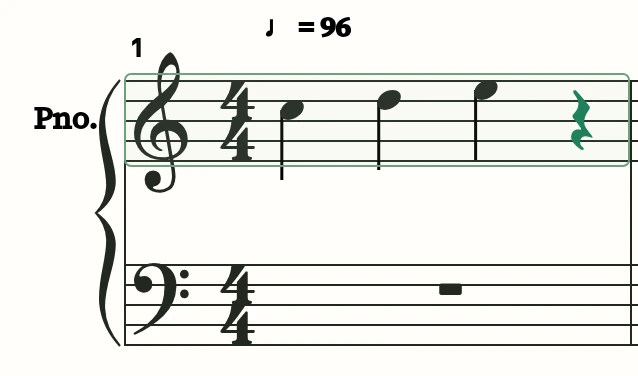
Write directly on a staff with Clefside, a free browser editor. This exercise makes one bar of piano music with three quarter notes and a rest.
Write your first measure
- With a blank score, choose Quarter in the Duration controls. The default 4/4 measure has four quarter-note beats.
- Focus Editable sheet music with Tab or click the score. Type C, D, E, then 0. Each entry advances one beat and 0 adds a rest. On a touchscreen, tap three beats from left to right on the upper staff, then choose Rest and tap the fourth beat.
- Choose Play from beginning. Turn on A–G above the score to see pitch names below the notes, or open Text score to read them as text.
Edit, save, and continue
Choose Select to edit an existing note. Use the arrow keys in the score to move between notes or change the selected pitch. Add instruments in the sidebar to write an arrangement. Use Export → Clefside score to keep a portable editable copy.
Read the keyboard and text score guide or open a complete score.